
Chess position scanner
Scan any chess position and get the best move
Point your phone at any chessboard — a real board at the table, a screenshot, or a diagram in a book — and ChessCopilot reads the position and shows the strongest move in seconds, powered by the Stockfish engine, offline.
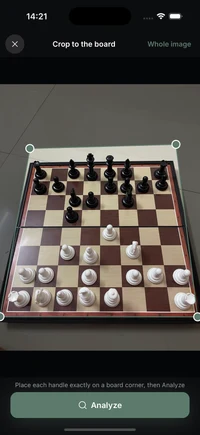
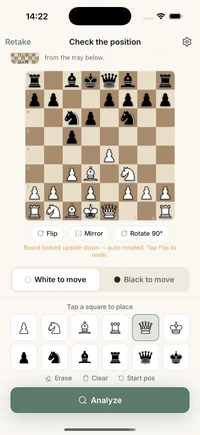
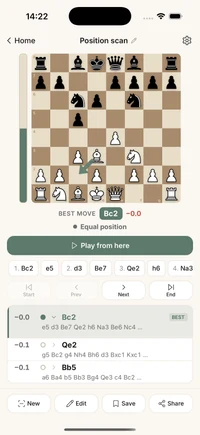
What ChessCopilot can read
- ✓ Real, physical boards photographed at an angle — tilted, shadowed, mid-game.
- ✓ Screenshots from Lichess, Chess.com, streams, or puzzle apps.
- ✓ Printed diagrams from books, magazines, and worksheets.
What you get from every scan
- ✓ The position as a FEN string you can copy anywhere.
- ✓ The best move in standard notation, plus the evaluation in pawns.
- ✓ The top engine lines to study — and a "Play from here" board to explore.
How it works
Point your camera at the board. The vision AI recognizes every piece and rebuilds the position — you confirm it in one glance. Then the on-device Stockfish engine returns the best move, the evaluation, and the lines behind it. No account, and your positions stay on your phone.
Why on-device matters
Unlike scanners that need a server, ChessCopilot runs Stockfish directly on your phone. That means analysis works offline — perfect for a crowded tournament hall or a spotty connection — with no waiting and nothing uploaded.
Good to know
Frequently asked questions
How do I scan a chess position from a photo?
Open ChessCopilot, point your camera at the board (or pick a photo from your gallery), and the app rebuilds the exact position. You confirm it in one glance, then get the best move and evaluation instantly.
Can it scan a real, physical chessboard?
Yes. ChessCopilot reads physical wooden boards photographed at an angle, on-screen screenshots, and printed diagrams. It auto-corrects the orientation and flags any square it is unsure about.
What does the scanner output?
You get the position as a FEN string, the best move in standard notation, the evaluation in pawns, and the top engine lines. You can copy the FEN or tap "Play from here" to explore.
Does the analysis work offline?
Yes. The Stockfish engine runs 100% on your phone. A connection is only used for the initial photo recognition step.
Is it free?
ChessCopilot is free to download and try, with an optional subscription for unlimited scans. Available now on iOS, with Android coming soon.