
Score-sheet digitizer
Turn a paper score sheet into a full game review
Scan the score sheet from your last tournament game. ChessCopilot reads the handwriting, rebuilds the game, and reviews every move with Stockfish — then exports to PGN, Lichess, or Chess.com.
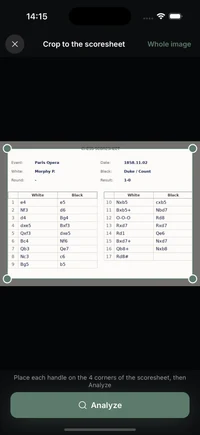
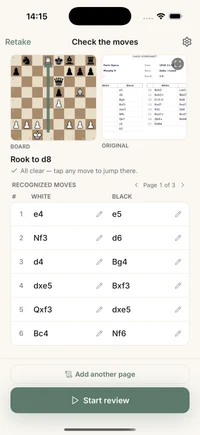
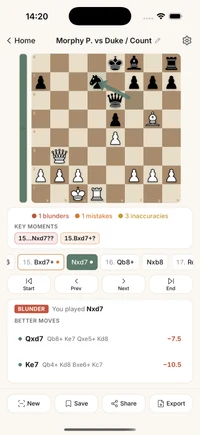
From paper to PGN in seconds
Manually typing a game into an analysis board is slow and error-prone. ChessCopilot reads your score sheet with AI trained on chess notation, so a full tournament game becomes a clean digital record in seconds — no more losing games to a drawer full of paper.
What it handles
- ✓ Handwritten and printed score sheets from real tournaments.
- ✓ Validates the game and fixes common notation slips automatically.
- ✓ Flags illegal or uncertain moves so you can correct them with one tap.
Review and export
- ✓ A full move-by-move engine review that flags blunders, mistakes, and turning points.
- ✓ Export as PGN or open straight in Lichess and Chess.com.
- ✓ Runs the Stockfish engine on-device — offline, no account.
Good to know
Frequently asked questions
How do I digitize a paper chess score sheet?
Take a photo of your handwritten or printed score sheet. ChessCopilot reads the notation, validates the game, fixes common notation slips, and rebuilds the full game — ready to review or export.
Does it read handwritten notation?
Yes. ChessCopilot is built for real tournament score sheets, including handwritten moves, corrections, and crossed-out notation. You can fix any uncertain move with one tap.
Can I export the game to PGN or Lichess?
Yes. Every digitized game exports as a PGN file or opens straight in Lichess and Chess.com for deeper study.
Does it analyze the game?
Yes. After rebuilding the game, the on-device Stockfish engine reviews every move and flags your blunders, mistakes, and the key turning points — offline, no account needed.
Is it free?
ChessCopilot is free to download and try, with an optional subscription for unlimited scans. Available now on iOS, with Android coming soon.